
Last updated on
Nov 6, 2026
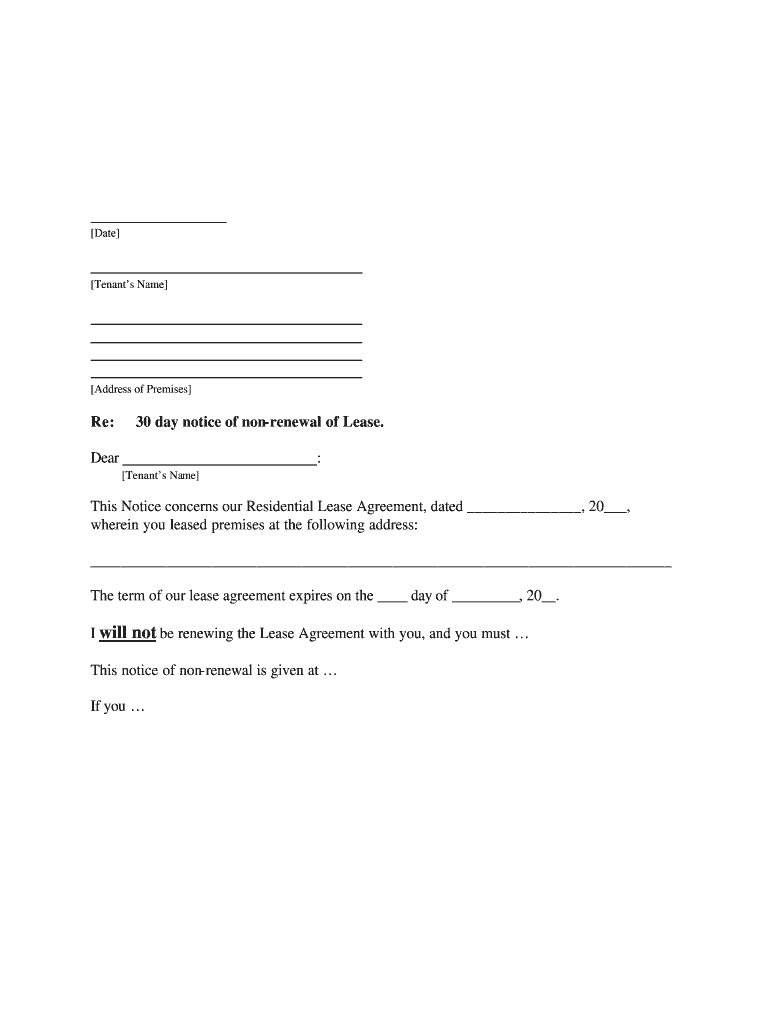
Get the free 30 Day Notice of Non-Renewal of Lease
We are not affiliated with any brand or entity on this form

Fill out
Complete the form online in a simple drag-and-drop editor.

eSign
Add your legally binding signature or send the form for signing.

Share
Share the form via a link, letting anyone fill it out from any device.

Export
Download, print, email, or move the form to your cloud storage.
Why pdfFiller is the best tool for your documents and forms


End-to-end document management
From editing and signing to collaboration and tracking, pdfFiller has everything you need to get your documents done quickly and efficiently.
Accessible from anywhere
pdfFiller is fully cloud-based. This means you can edit, sign, and share documents from anywhere using your computer, smartphone, or tablet.
Secure and compliant
pdfFiller lets you securely manage documents following global laws like ESIGN, CCPA, and GDPR. It's also HIPAA and SOC 2 compliant.
What is Lease Non-Renewal Notice
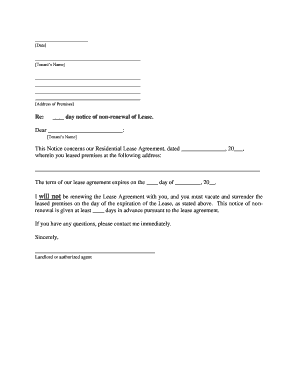
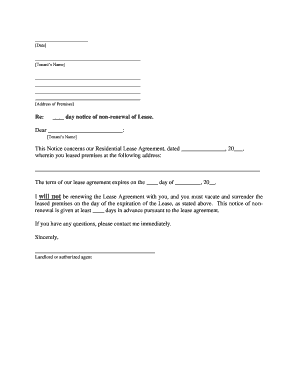
The 30 Day Notice of Non-Renewal of Lease is a legal document used by landlords in the United States to inform tenants that their residential lease will not be renewed.
pdfFiller scores top ratings on review platforms




Really Great Technology in Signing and Filling out Documents
it's a life saver, especially for having too upload documents. im glad I stumbled upon the website.
Who needs Lease Non-Renewal Notice?
Explore how professionals across industries use pdfFiller.

Lease Non-Renewal Notice is needed by:
-
Landlords managing residential properties
-
Real estate agents facilitating lease agreements
-
Property managers overseeing rental units
-
Tenants needing clarification on lease terms
-
Legal professionals assisting with real estate
-
Individuals studying residential lease laws
Comprehensive Guide to Lease Non-Renewal Notice
What is the 30 Day Notice of Non-Renewal of Lease?
The 30 Day Notice of Non-Renewal of Lease is a key document utilized in U.S. residential rental agreements to formally inform tenants that their lease agreement will not be renewed. This notice serves as a safeguard for both landlords and tenants, ensuring clear communication regarding lease termination.
It is essential for landlords to provide this notice to tenants at least 30 days before the lease's expiration date. The document must include specific details, such as the landlord's signature, along with the tenant's name and address of the leased premises.
Purpose and Benefits of the 30 Day Notice of Non-Renewal of Lease
Employing the 30 Day Notice of Non-Renewal of Lease is beneficial for landlords to avoid potential disputes. This document clarifies that the lease will not be extended, allowing tenants to prepare for their next steps.
-
Prevents misunderstandings regarding lease continuity, setting clear expectations.
-
Acts as a documented form of communication between parties.
-
Protects landlords' rights to reclaim their property without complications.
Who Needs the 30 Day Notice of Non-Renewal of Lease?
This notice is vital for both landlords and tenants. Landlords, defined as individuals or entities that own rental properties, must issue this notice under specific circumstances, such as when they choose not to renew a tenant's lease. Tenants, on the other hand, are those occupying the rental property and should be aware of their rights and responsibilities upon receiving such a notice.
Upon receiving the notice, tenants may respond by confirming their intent to vacate or seeking clarification on the lease termination.
How to Fill Out the 30 Day Notice of Non-Renewal of Lease Online (Step-by-Step)
Completing the 30 Day Notice of Non-Renewal of Lease online is a straightforward process that can be done through platforms like pdfFiller. Follow these steps to ensure accuracy:
-
Enter the tenant's name and the address of the premises.
-
Provide the lease expiration date.
-
Review all entries for correctness, ensuring completeness.
-
Utilize pdfFiller's features to sign and finalize the document.
Ensuring accuracy is critical, as any errors may jeopardize the notice's validity.
Common Errors and How to Avoid Them
When filling out the notice, landlords frequently make errors that can compromise the notice's effectiveness. Common mistakes include:
-
Omitting or entering incorrect dates and signatures.
-
Providing insufficient notice to tenants, leading to potential legal issues.
-
Failure to follow state-specific requirements for notice delivery.
Awareness of these pitfalls can help landlords create a valid and effective non-renewal lease form.
Submission Methods for the 30 Day Notice of Non-Renewal of Lease
Once completed, the 30 Day Notice can be delivered to the tenant through various methods. Key submission options include:
-
Email: A quick and efficient way to send the notice.
-
Postal Mail: Traditional method ensuring the notice is officially documented.
-
In-person delivery: Ensures the tenant received the notice directly.
It is crucial for landlords to keep records of the delivery method to safeguard their rights, especially if disputes arise later.
What Happens After You Submit the 30 Day Notice of Non-Renewal of Lease?
After submission, tenants have a set period to respond, which may include deciding whether to vacate the property. Open communication during this time is essential to ensure a smooth transition.
The timeline for moving out or confirming lease non-renewal typically begins once the tenant acknowledges receipt of the notice. This period is critical for both parties to prepare for any changes.
Security and Compliance When Using the 30 Day Notice of Non-Renewal of Lease
Handling sensitive information when issuing the notice is crucial. pdfFiller emphasizes security through:
-
256-bit encryption to safeguard user data.
-
Compliance with HIPAA and GDPR standards to protect privacy.
-
Best practices for managing landlord-tenant information securely.
These measures ensure both landlords and tenants can manage their documents with confidence.
Transform Your Form-Filling Experience with pdfFiller
pdfFiller offers a range of tools to enhance the process of completing the 30 Day Notice of Non-Renewal of Lease. Notable features include:
-
eSigning capabilities for quick document finalization.
-
Edit and fill options that simplify form completion.
-
User-friendly interface designed for efficient document management.
Users are encouraged to leverage pdfFiller for a hassle-free experience.
How to fill out the Lease Non-Renewal Notice
-
1.Access pdfFiller and use the search bar to find '30 Day Notice of Non-Renewal of Lease'.
-
2.Once the form is open, familiarize yourself with the layout, focusing on the blank fields.
-
3.Gather necessary information such as the tenant's name, address of the premises, and lease expiration date before starting.
-
4.Begin filling in the fields, starting with the tenant's name and address, followed by the lease expiration date.
-
5.Complete all required fields ensuring accuracy to avoid potential delays.
-
6.Once all information is entered, review the completed document to ensure all details are correct and no fields are left blank.
-
7.Check that the landlord's signature field is provided and sign directly within pdfFiller.
-
8.After reviewing, you can save the document or download it as a PDF for your records.
-
9.To submit the notice, send it via email or certified mail to the tenant as per your preference.

Who is eligible to use the 30 Day Notice of Non-Renewal of Lease?
Any landlord in the United States who wishes to notify a tenant about not renewing their residential lease is eligible to use this form. It is specifically designed for leases requiring prior notice.
When must I send the 30 Day Notice of Non-Renewal of Lease?
The notice must be sent at least 30 days prior to the lease expiration date. Ensure timely delivery to comply with this requirement for legal effectiveness.
What should I include when completing the form?
Include the tenant's name, the address of the rental property, lease expiration date, and ensure the landlord's signature is present. These details are crucial for the notice's validity.
Can the form be submitted electronically?
Yes, you can save the completed form as a PDF and email it to the tenant or choose to print and send it via certified mail. Make sure to follow any specific state requirements for submission.
What are common mistakes to avoid when filling out this form?
Common mistakes include omitting necessary signatures, leaving fields blank, and failing to send the notice within the required 30-day period. Double-checking information can mitigate these errors.
Is notarization required for the 30 Day Notice of Non-Renewal of Lease?
No, notarization is not required for this form. However, ensure that the landlord's signature is present for the notice to be valid.
What happens if the tenant does not receive the notice on time?
If the tenant does not receive the notice within the stipulated 30 days, they may be entitled to remain in the property, as proper procedure was not followed. Timeliness is crucial.
Related Content
Related Forms




Related Catalogs
Get the latest insights from our blog


If you believe that this page should be taken down, please follow our DMCA take down process
here
.
This form may include fields for payment information. Data entered in these fields is not covered by PCI DSS compliance.